
A Beginner-Friendly Tutorial to Download Movie Scripts Automatically
The internet contains a massive amount of valuable text data, and web scraping allows us to actively explore and extract it. Web scraping allows you to extract useful information from websites automatically using code. In this tutorial, you will learn how to scrape movie transcripts from a website using Python’s requests and BeautifulSoup libraries.
We will walk through the code step by step, explain what each part does, and then provide a clean, structured version of the full script at the end.
Libraries Used in This Project
Before diving into the logic, let’s understand the two main libraries used:
- requests: Used to send HTTP requests and fetch webpage content.
- BeautifulSoup (bs4): Used to parse HTML and extract specific data from web pages.
These two libraries together form the backbone of most beginner-level web scrapers.
Step 1: Sending a Request to the Website
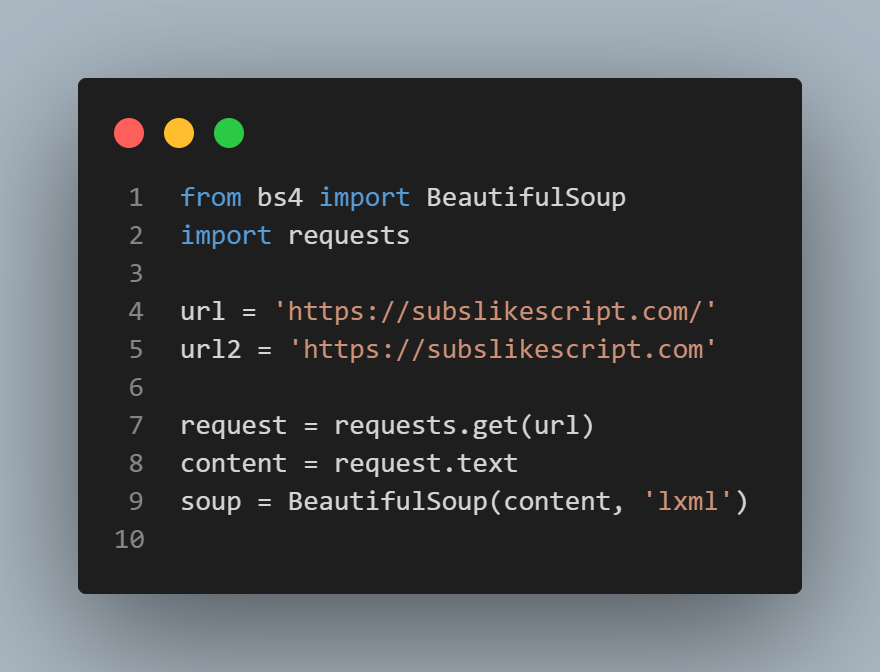
Here, we send a GET request to the website. The response is converted into readable HTML using request.text. Then, BeautifulSoup parses the HTML using the lxml parser for fast performance.
Step 2: Finding All Movie Links
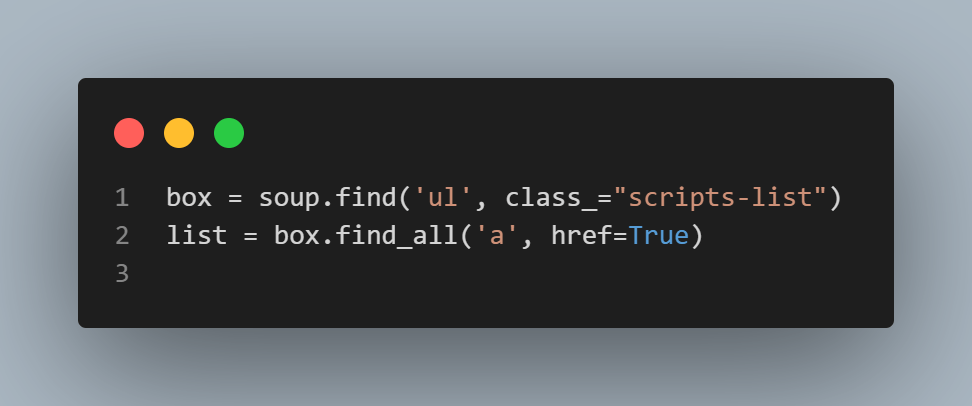
This part searches for the <ul> tag that contains all movie links. Inside that list, every <a> tag contains a movie URL. Using find_all, we collect all of them.
Step 3: Storing All Extracted Links
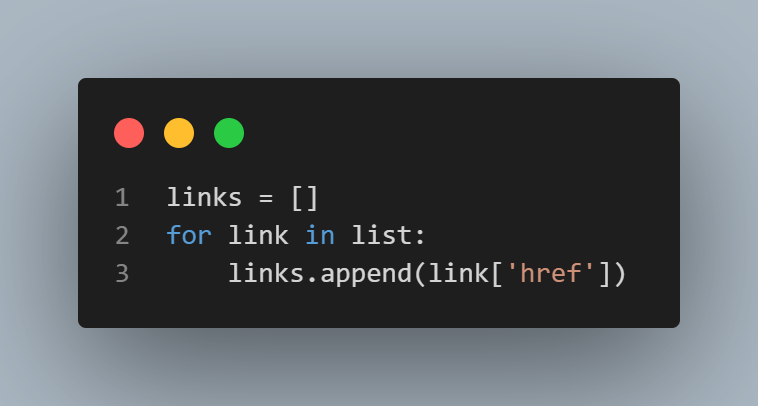
Here, we loop through every <a> tag and extract only the href attribute, which contains the actual movie page URL. These URLs are stored inside a Python list.
Step 4: Visiting Each Movie Page
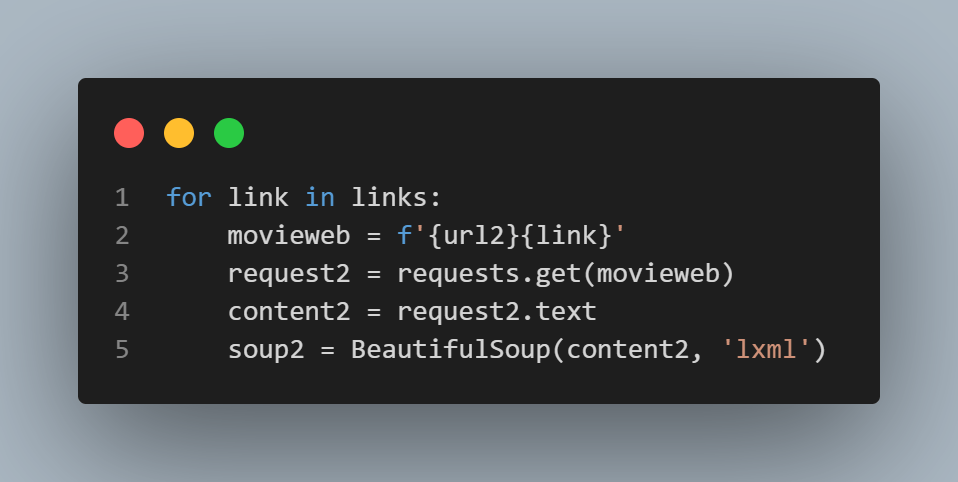
Now we visit each movie page by combining the base website URL with the extracted relative link. The script downloads each page and parses it again with BeautifulSoup.
Step 5: Extracting Title and Transcript
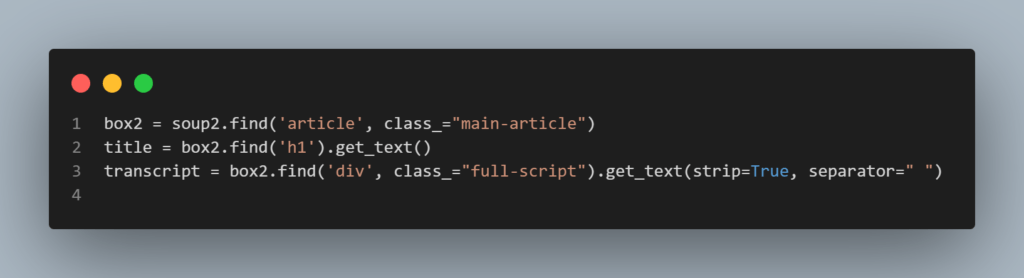
This section extracts:
- Movie Title from the
<h1>tag. - Full Transcript from the
<div class="full-script">container.
The get_text() function cleans the text and removes HTML tags.
Step 6: Saving the Transcript to a Text File
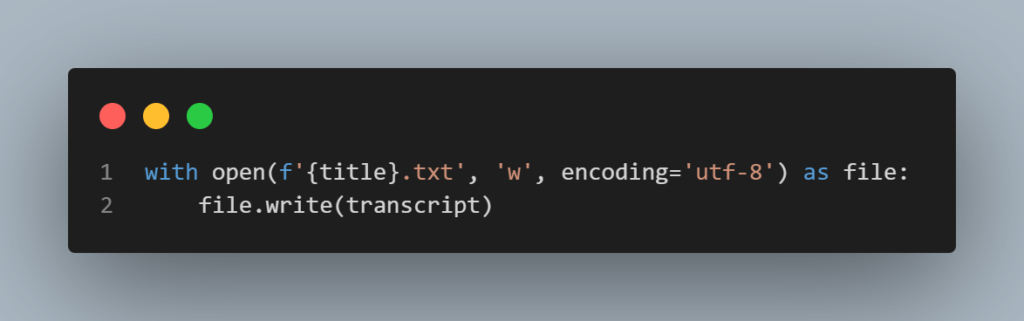
Each movie’s transcript is saved as a separate .txt file using the movie title as the filename. UTF-8 encoding makes sure special characters display correctly.
Final Clean & Structured Code
from bs4 import BeautifulSoup
import requests

url='https://subslikescript.com/'
url2='https://subslikescript.com'

request=requests.get(url)
content=request.text
soup=BeautifulSoup(content,'lxml')

box=soup.find('ul', class_="scripts-list")
list=box.find_all('a', href=True)

links=[]
for link in list:
    links.append(link['href'])

for link in links:
    movieweb = f'{url2}{link}'
    request2 = requests.get(movieweb)
    content2 = request2.text
    soup2 = BeautifulSoup(content2, 'lxml')

    box2 = soup2.find('article', class_="main-article")
    title = box2.find('h1').get_text()
    transcript = box2.find('div', class_="full-script").get_text(strip=True, separator=" ")

    with open(f'{title}.txt', 'w', encoding='utf-8') as file:
        file.write(transcript)
Final Thoughts
This project is a perfect example of how Python can automate real-world tasks like collecting movie scripts. With just two libraries, you can build powerful data collection tools. From here, you can upgrade this scraper by adding pagination, error handling, or even storing data in a database instead of text files.
Web scraping is not just coding – it’s digital exploration.

If you’re new to web development and want to strengthen your foundation before diving deeper into Python automation, don’t miss our beginner guide:
“HTML Tutorial For Beginners: Create Your First Website Today” a perfect starting point to build your first real website from scratch.
Alright, so 7game’s the name, and keeping it real is the game! Lots to see, kept me entertained for a bit. Check it out yourself: 7game
Alright lads, gave f16878vip a go last night. Not bad, a decent selection of games. Could use a bit more polish on the site, but the odds seem alright. Worth a punt if you’re looking for something new. Check ’em out! f16878vip
Winmxn, vamos por esas ganancias mexicanas! Espero que me traiga suerte este sitio. Ya les contaré como me va. ¡Suerte a todos! Conoce más en winmxn.
Yo, qq88app! Just tried it out, pretty slick. Found some cool games and the navigation wasn’t a headache. Def worth checking out if you’re looking for something new. Check it out here: qq88app
Thinking about trying 10jilionlinecasino. Anyone had any luck there? Looking for some recommendations before I deposit. Visit 10jili Casino: 10jilionlinecasino
Pingback: Python Password Generator: Create Strong Passwords - BitraMind